
Once your leasing team is all set up and leads are flowing in, it's time to start managing your leads. Your Leasing Dashboard functions as a full CRM for organizing and working with incoming leads, as well as a junior assistant - handling the initial pre-qualification questions for new leads based on your criteria, auto-scheduling tours, and generally handling the tedious and time-consuming tasks that eat up an agent's day-to-day, leaving agents free to spend their time closing good leads rather than disqualifying bad ones. Notably, this will allow all your leads to get an immediate response no matter when they submit their inquiry.
Pre-Qualification Flow
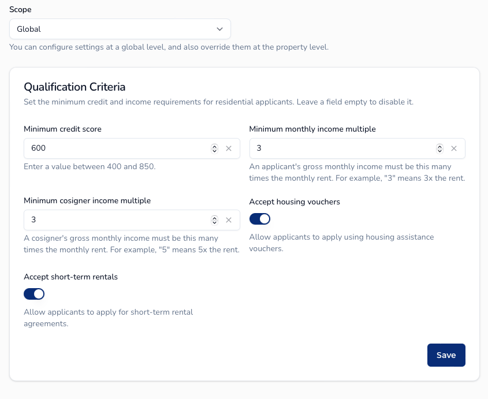
When a new lead comes in - no matter the day or time - ASSIST AI will immediately message the renter to confirm their basic information (move in date, number of roommates and pets, income level, and credit score). This is based on the requirements you set for each property - which can be changed to allow for more or less leniency depending on your desired screening preferences.
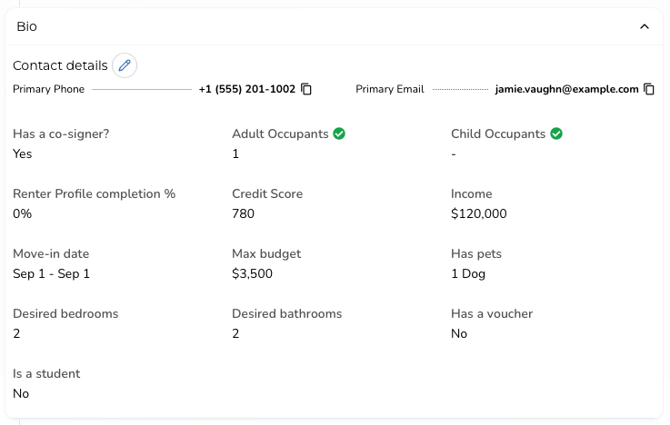
All information gathered here will be added to the renter bio section of the lead page - where you can view a complete renter profile with all important information.
Automated Tour Scheduling
If all the information provided by the renter aligns with the requirements for the apartment, the AI Assistant will send a link to the renter to auto-schedule a tour. This link will only present times that are enabled in the agent's schedule, which is adjustable in the Configuration tab. Once the renter has selected a time, the agent will need to confirm the tour.
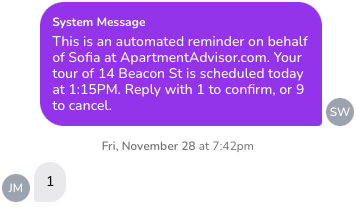
Once the tour is confirmed, the current tenant will receive a notification via text/email at the time of scheduling and a reminder the day before, and the lead will receive a confirmation 24 hours before the tour with the option to confirm or cancel.
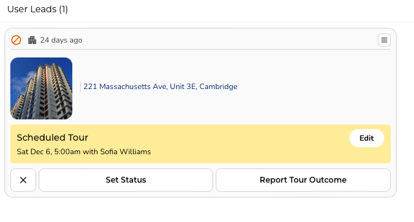
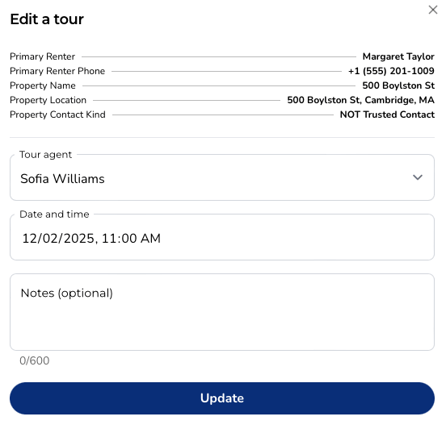
If changes need to be made to the tour time, these can be made by clicking the edit button. Any changes made will be automatically communicated to both the renter and the tenant.
Group Tours
If you prefer to conduct group showings, the Scheduling Assistant can be configured to guide renters to an existing time slot with a tour already scheduled to maximize your time and conduct as many showings in a single time slot as possible. If the renter declines the existing time slot, a link will be sent to them to schedule their tour as normal. Up to 4 tours can be scheduled during a single time slot.
.png?width=562&height=405&name=image%20(6).png)
Manually Scheduling a Tour
Sometimes, an agent will need to manually schedule a tour. Below is a step-by-step guide to scheduling a tour without AI involvement.