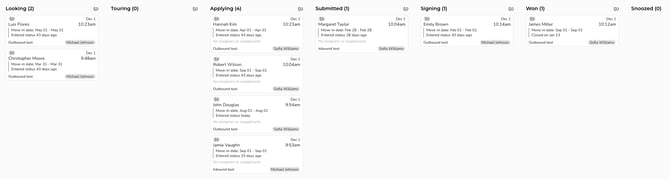
As a full leasing CRM, Lease Assist gives you a clear, detailed view of your entire lead pipeline. Every opportunity moves through defined pipeline stages so agents can see all their leads by status with a single click. Knowing how to navigate this pipeline view is valuable for both Agents and Leasing Managers: Agents can quickly see the status of all their open deals so they know exactly what to prioritize and what needs to be done at any point in time, while Leasing Managers can see the full scope of their team’s pipeline and track where each deal stands across multiple teams and users.
Pipeline Stages
Opportunities in Lease Assist move through the pipeline in a series of stages. These update both automatically and manually - ensuring each lead remains in the proper stage at all times and giving agents and up-to-the-minute view of where every opportunity stands in real time. 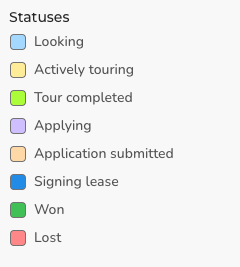
Looking: This is the first stage of the pipeline, and what all new leads are automatically assigned.
Actively Touring: This stage is automatically assigned once the lead has scheduled a tour.
Tour Completed: This stage is automatically assigned once the tour has been confirmed and completed. If the renter does not want to apply, they can be manually moved back to Looking.
Applying: This stage can be set manually once the lead indicates they intend to apply.
Application Submitted: This stage is set manually once all documents have been collected and the application has been submitted and is pending approval.
Signing Lease: This stage is set manually once the application has been accepted but signatures have not been collected.
Won: This is the final stage, set manually after the lease has been signed by all parties, deposits have been collected, and everything is finalized.
Lost: This stage is used to indicate opportunities that did not pan out. A closed/lost reason can be chosen from a list of options at the time of closing, allowing for better tracking of the most common reasons opportunities don't close.
Sorting Opportunities by Status
Agents can filter opportunities by status, selecting one or more statuses from the list to display only those matching deals and hide all others.
Using the Pipeline View
The pipeline view gives you a comprehensive snapshot of all deals at each stage, showing who owns each deal and key high-level details at a glance. Leasing Agents can only see the deals they personally own, while Leasing Managers and Admins can see every deal across all agents. This creates strong visibility for managers, who can monitor each opportunity in real time and review the full communication history between renter and agent. Use this view to understand the overall health and flow of your lead pipeline, rather than looking at individual leads in isolation.