
ASSIST Leasing is a powerful tool designed to qualify inbound leads automatically, keep the leasing team organized, and move renters through the pipeline with as little manual effort as possible. It features a full CRM for lead management, a built-in AI Assistant that automatically handles lead qualification and tour scheduling, provides information to prospects, and allows your agents to provision a phone number that can be used for both texting and calling directly from browser or mobile app.
Adding your Agents
Now that you're signed up, your first step will be adding your agents to the system.
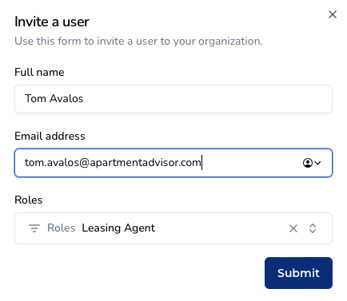
1. From the Manager Dashboard, navigate to Users in the sidebar menu.
2. Click Invite a user.
3. Enter the new user's full name and email address and select the role Leasing Agent - the user will receive an email invite with instructions on how to log into the system.
Provisioning a Phone Number for Agents
Once you've invited your agents to join, they'll be able to provision their own unique phone number immediately upon logging in. This will be the number that the AI Assistant will text from, and can also be used to communicate with leads via phone or text directly from the ApartmentAdvisor app.
1. When an agent logs into Lease Assist for the first time, they will be prompted to set up their phone number before accessing any other part of the system.
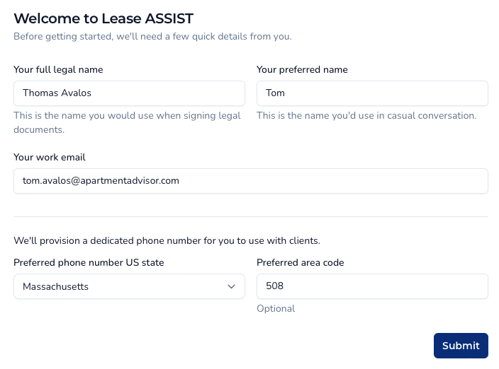
2. After entering their full and preferred name, the agent will select a US State and preferred area code for their provisioned phone number. As soon as this form is submitted, the number will be provisioned. This will be the agent's main number used to communicated with prospects moving forward.
Agent Scheduling
Now that your agents are logged in and ready to start taking leads, they'll need to make sure their schedules are up to date for tour scheduling purposes. Leasing Managers can modify agent schedules, and Leasing Agents can modify their own schedules, but not those of other agents. See the below guides for a detailed look at changing agent schedules:
In addition to setting up Agent Scheduling this in the platform, a Google Calendar integration is also supported. The working hours an agent sets will be considered alongside their Google Calendar availability for a complete picture of their touring availability.
Once agents have been added, provisioned, and set their schedules, it's time to set up lead routing!